Darkest Dungeon - Custom Party Names (Mac OSX)
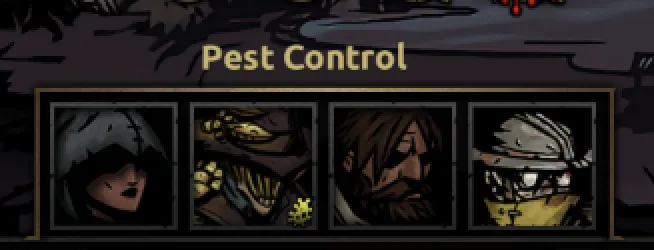
As per usual, the literature on modding/save-editing files on MacOSX are bitter and slim and thus I've put together this little guide on how to get that done. You know, for the 0,01% of us who are gaming on a MacBook.
Note: this method requires temporarily installing the windows version of the game on your Mac with programs like Whisky or CrossOver.
Step 1
Locate the files
party_names.string_table.xml
party_name_library.json
For Steam users, this will be located in the following file paths:
/Users/[YourUsername]/Library/Application Support/Steam/steamapps/common/DarkestDungeon/_osx/Darkest.app/Contents/Resources/data/localization/party_names.string_table.xml

/Users/[YourUsername]/Library/Application Support/Steam/steamapps/common/DarkestDungeon/_osx/Darkest.app/Contents/Resources/data/shared/party_name/party_name_library.json
For GOG users, this will be located in the following file paths:
/Applications/Darkest Dungeon.app/Contents/Resources/data/localization/party_names.string_table.xml

/Applications/Darkest  Dungeon.app/Contents/Resources/data/shared/party_name/party_name_library.json
Step 2
Next, you'll want to edit the party_names.string_table.xml file with your text editor of choice. Find your preferred language within the text file and right underneath the last vanilla party roster name entry, add your customised squad name.
It should look something like this:
<language id="English">
[...]
[...]
[...]
<entry id="party_name_409"><![CDATA[Swan Lake]]></entry>
<entry id="party_name_410"><![CDATA[YOUR PARTY NAME]]></entry>
Note: be sure to update the party_name id number! (party_name_410, party_name_411 etc...)
Step 3
Afterwards, you'll want to edit party_name_library.json and provide the heroes that make up the customized party roster by adding the following underneath the last entry:
 ,
        {
    "id": "410",
    "required_hero_class": [
      "[Position 4 Hero]",
      "[Position 3 Hero]",
      "[Position 2 Hero]",
      "[Position 1 Hero]"
    ]
  }
To find the hero class ID of modded heroes, you'll want to go into the modded hero files and search for
[HERO ID].info.darkest
For Steam, this will be located under
/Users/[YourUsername]/Library/Application Support/Steam/steamapps/workshop/content/262060/[MOD ID]/heroes/[HERO ID]/[HERO ID].info.darkest
For GOG, this will be located in the mod folder where you installed the mod:
Darkest Dungeon.app/Contents/Resources/data/mods
All-in-all, your party_name_library.json should look something like this (using the modded custom squad in the screenshot above as an example):
    "id": "395",
    "required_hero_class": [
      "vestal",
      "jester",
      "jester",
      "jester"
    ]
  },
  {
    "id": "410",
    "required_hero_class": [
      "falconer",
      "dis_trapper",
      "houndmaster",
      "exterminator"
    ]
  },
  {
Note: again, make sure party name ID in party_names.string_table.xml and the ID Number in party_name_library.json match!
Step 4
Now comes the annoying part. As mentioned at the beginning, you'll need to (temporarily) install the windows version of Darkest Dungeon on your Mac via free services like Whisky or paid services like CrossOver.
After doing so, replace the (vanilla) party_names.string_table.xml and party_name_library.json files in the windows install with the (edited/modded) versions you have created.
Then you'll need to locate and run
localization.exe
from the /localization folder (in the windows install). Which may or may not even be included in your files - in which case, download it from here and put those files in the /localization folder of the windows install.
After running the .exe, it should now create the following files:
koreana.loc2
koreanb.loc2
japanese.loc2
schinese.loc2
italian.loc2
czech.loc2
polish.loc2
russian.loc2
brazilian.loc2
spanish.loc2
german.loc2
french.loc2
english.loc2
missing_strings.csv
party_names.string_table.xml
Copy-Paste those newly generated files into your native Mac installation /localization folder and overwrite the existing files.
Step 5
Et, voilà! Congrats on creating your first custom party name. Rinse and repeat for as many combinations and name ideas that you have!
Just remember to backup your files before doing any big file editing..... overconfidence is a slow and insidious killer.
Hope this step-by-step guide is helpful.
Cheers,
Morrowindnostalgia